We’ve been heads-down working on countless things on our end, everything from plugins and courses to projects and beyond. Your support and patience is well-recognized on our side of the table, it’s what keeps us motivated! Many eager sponsors have come forward to suggest features of not just the next release of this plugin but for our accompanying course material too!
As a flag to stand by, we’re excited to slate the Stripe.js 2.0 release for February 10, 2020.
We were pushed back just a bit while we waited for confirmation from Bubble on a sorting update. Unfortunately, Bubble’s decision didn’t go our way but we’re using that time to clean up plus firm up features we had slotted for patches. Our (most recent) updated ETA is end of this week, so stay tuned!
Psst…you can still help us beta test and get a free course. Email us at plugins@withcopilot.com and we’ll get you a spot.
We had a handful of awesome Bubblers come forward to assist for this version! If you’d be interested in becoming a go-to beta tester for Stripe.js, do email us and we’ll tally you into the list.
I am using stripe Connect with custom accounts. As I am based in France I need to use account Token for almost everything regarding custom accounts.
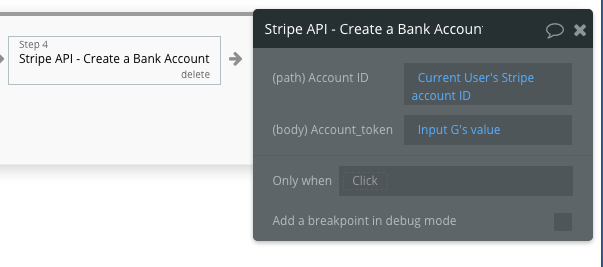
To add a Bank account into my seller’s stripe Account, I created the followong with the Bubble API connector plugin.
I am wondering if this is secure or not ?
Fir this I created a page with Inputs for each data.
As the call is set to “DATA” I can put it directly from an element in the webpage(using “get data from external API”).
Stripe returns a Bank account Token I can pass through my app and then have a workflow updating the seller account with the Bank account.
It works fine in live mode and Stripe return no error code… So technically no issue.
But I am wondering how secure it is ? And if it is compliant with bubble or stripe requirement ?
Also I have outstanding tasks in my Stripe Dashboard stating that I need to do modifications on my API Calls because of the update they are rolling out on February 20.
If Stripe.js 2.0 does not come out before then, are my calls using Stripe.js going to fail?
We’re absolutely doing our best to plan for upcoming changes to Stripe’s various products including Connect.
As many know, the largest contributor to the delay of Stripe.js’ next major release has been Stripe’s periodic changes, which absolutely affected our development efforts. In order to stabilize our approach, Stripe.js 2.0 is fully-aligned with the latest Stripe API at this time (2019-12-03). We’re looking forward to sharing the full release though many have already gotten their hands on it through the latest Version 1.9.x available in your Plugins tab now.
We’ll be keeping an eye on Stripe’s changes as we’ve always been, and will structure a plan to help applications remain compliant with Stripe while minimizing transition efforts.
That being said, I am in desperate need of some updated documentation or SOMETHING that explains how to properly use all of the updates after 1.8.10. Upgrading breaks about 70+ processes in my app, and even though I’ve tried replicating certain processes it seems some options like the “is paid” is just missing along with others that are very useful to me.
Also the new version seems to have an issue with things like if I’m trying to retrieve a product, say like as a Data Source, even after entering the Stripe product’s ID, it is not recognized. Or if I’m trying to insert dynamic data, it does not allow me to select anything. No options populate so I cant input things like “retrieve a product’s name” or anything.
So for now I’m stuck with 1.8.10.
Is there any updated documentation and training for this plugin?
Stripe.js 2 moves away from the unreliable API model to the maintainable and highly-assistive JS approach. As mentioned in previous posts and within our Beta program, Stripe.js 2 is a breaking update which means you will encounter issues within your application. As one can imagine, we’ll produce content and materials specifically for the around-the-corner Stripe.js 2 update including upgrade guidance. However, there is no better documentation for Stripe than Stripe’s own documentation which you can supplement with our existing course to setup older versions of Stripe.js such as those you mentioned.
Just like the above, we’ve noted many times to give us a shout over at plugins@withcopilot.com to keep this thread clear for updates and we hope to see your communication there.
Basically, @copilot’s answer basically means you are on your own. You can try emailing them to see if you get a response.
The easier thing to do is wait for their course to be out. I’ve tried figuring out with Stripe’s documentation and their plugin, but only managed to get it working after countless tries. I basically ran through their ‘advised process’ in their payment intent docs and tried to find the corresponding function in their Stripe JS plugin. Not an efficient use of time, but oh well, this is the danger of relying on a free plugin.
Granted, I could have looked up this information myself before asking, at the same time I guess my thing is if you’re going to roll out updates that break people’s apps you should also include your specific documentation.
Either way I’m still grateful for the work they’ve done so far and I’m looking forward to their updated courses. I just hope that going forward, newer updates to the plugin come hand in hand with the documentation and courses.