to anyone who is trying to setup a call system in your Bubble app where you respond to inbound calls and texts that you receive via webhook, you may encounter the following challenge with Twilio
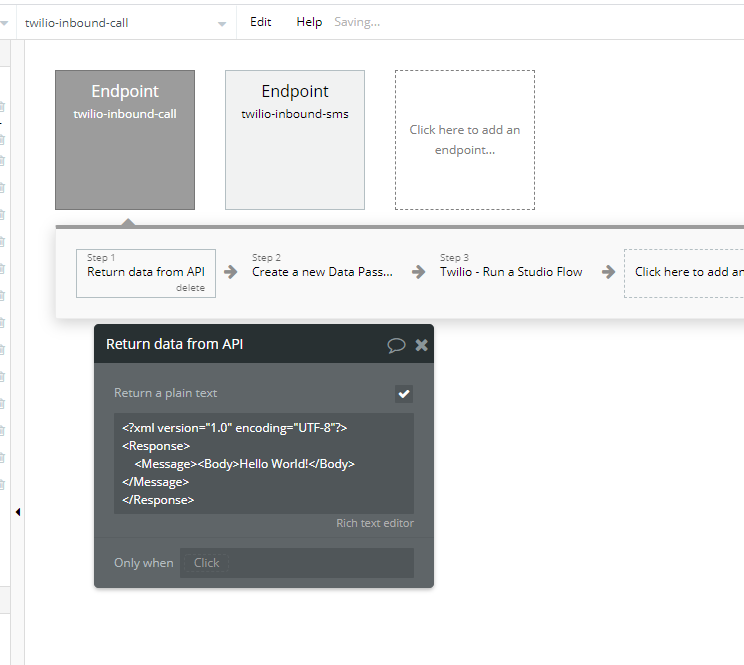
Error - 12300 which means invalid content type. To solve this problem and remove the error, you need to add an api response workflow to the Api workflow / endpoint that is recieving the call as follows
Basically you need to give Twilio some instructions using their language called “Twiml” you can find the Twiml language reference here: TwiML™ for Programmable Messaging | Twilio
In this case we are saying Hello World! to the person calling in, you can add different Twiml to match your specific use case
Hope this helps anyone who is stuck on this in the future! It’s a simple fix but took me too long to figure out
Hi, this is really helpful - thanks a lot for sharing.
I’m encountering something similar when sending SMS messages via Twilio from my Bubble app - invalid content type, which I’m guessing is down to needing to give Twilio some instructions using their language.
Happy to have a dig around, but wanted to ask if you have any pointers? I’m very much a no-code developer here, you see. Thanks!
Hoping that bringing up an old thread can keep relevant info together.
Was this using the Copilot plugin called “Twilio”?
I’ve been trying to set up just a simple message to tell people who ring my twilio number that is a system number.
The data seems to be going back into Twilio (See screenshot) but the phone call simply hangs up after a couple of seconds. Twilio always just points back to the content type issue so Im not getting any help there!
Yup. The way I do it, through the back end webhook, first step is create a new DB(message in my case), then add it to the lead that those messages belongs to. The way I find it is, when initially we create a conversation with that receivers phone #, we add the Twilio SID CH to it, so that allows us to search the DB later on. Then to convert the twilio text to url, we use their chatservicegetmediaurl endpoint. I hope that makes sense.
sorry for drudging up an old thread, I sent this to Bubble support and they basically said it is what it is, meaning there is no solution. If you set a return from API, Twilio sends that text via SMS so there is no way to suppress the warnings that Twilio generates. Twilio support also said that there’s nothing that can be done until Bubble can be set to use plain/text content types.