I wouldn’t necessarily say it is overkill. When Bubble announced their WU pricing strategy, my first reaction was that data fetching would be prohibitively expensive, and requested a feature to allow us to elect which fields we want returned. That is because a large part of the cost of fetching is the number of characters of data returned. However, in practice, the real driver of why fetching data is so WU intensive, is the cost associated with each item returned.
When I set out to come up with a solution for my own apps as after 18 months, it became evident Bubble was not going to implement the features to help reduce the costs of fetching data, I had to tinker and play a lot with different concepts until landing on the one that works.
The best and truly only way to really reduce the cost of WUs using plugins with no 3rd party layers (ie: pretty much just Bubble), is to use a Hybrid Data Structure approach, in which you use API objects instead of custom data types. So what happens here, is if you compare legacy data structure in which only option sets and custom data types are utilized to a hybrid data structure, in which all four data types are utilized, the same apples for apples data fetch of a particular type of data and data set, using a hybrid data structure you could return, for example a list of 1,000 api objects with the same exact number of characters of data, as a custom data type fetch of 1,000 data entries, but the difference is that hybrid data structure approach is going to actually fetch just one single thing while custom data type fetch is going to return 1,000 items. So the WU cost savings is 999*0.015=15 WUs, while the per character cost is equal.
What I say this means is, the Data Jedi plugin is fit for the job and delivers the type of results desired, but by no means is the only way to achieve the results. Now, the whole hybrid data structure approach is really the key, it is not that Data Jedi makes it possible, anybody can implement the hybrid data structure approach without a plugin, since Bubble database by default allows us to store api objects as fields in custom data types. There are various free plugins that can be cobbled together to get the same type of functionality needed to create and modify api objects, but Data Jedi just makes it simple and a real ‘no code’ solution for those tasks.
Yes, I see how the plugin is doing that with it’s exposed states of lists of index numbers, referencing likely the index value of the JSON array the plugin creates. This doesn’t really make it that easy to work with though as the added, modified and to delete tracking is not tracking ‘objects/things’ it is just tracking a number value, so it is a bit more difficult to more feature rich value from it, such as knowing which field was modified, or what are the other field values of modified items etc.
The setup of the plugin element itself as well is a bit cumbersome and limited. If the user is needing to add source values for each field and a field type for each field and is limited to just 10 fields, it becomes less versatile and useful, especially in scenarios of viewing the full list of data in a dashboard as there are so many scenarios in which a data type will have more than just 10 fields.
You could alter the way the plugin operates to have a single field that is the type of data and another field that is the data source, making it simpler for users to setup. And have the plugin detect the fields, their types from the datasource, so that it is not limited to just 10 fields, makes it more versatile and easier to set up and enables the functionality to track the complete ‘object/thing’ in the exposed states rather than just an index value. If you made those changes it could definitely be minimal setup, quick to learn and built for reducing the number of data fetches needed per session.
Also, make sure the plugin works properly with Dates. In the demo the date field is just a number (your input) but the plugin shows as field type of date, so no matter which value I enter into the date input, the date value is Jan 1, 1970.
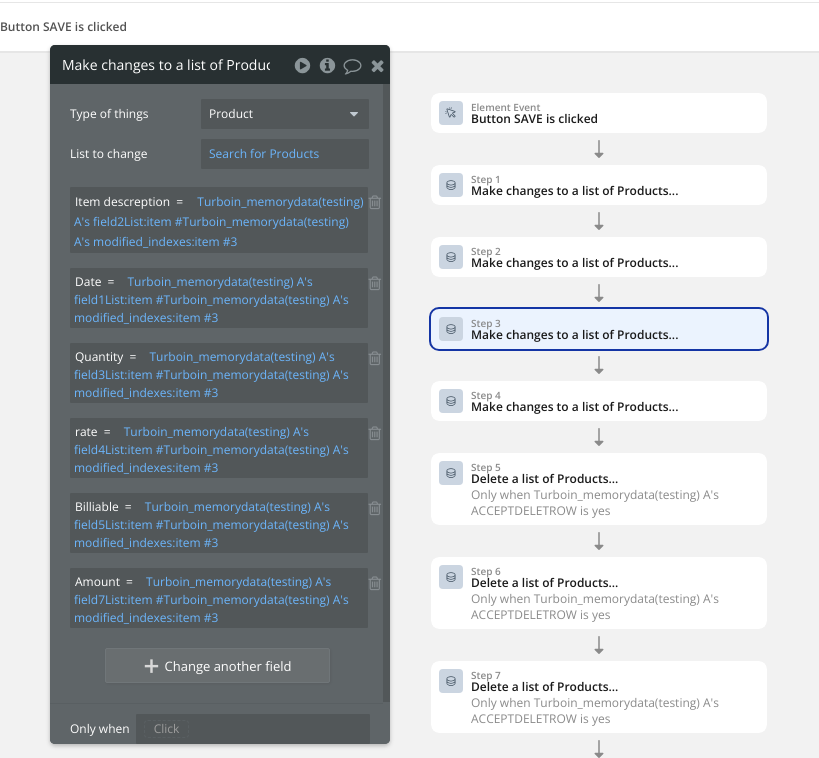
Also, you need to make it so that the Create portion part of the process is not going to ADD extra WU consumption. Currently you plugin requires the save process to have a very cumbersome setup, meaning the developer has to program, each ‘create thing’ which means, that it is not easy, nor performant and very very limited. How is a developer supposed to set it up so that when a user creates 1,000 items the save part actually works? Is that a requirement of having 1,000 create new thing actions all with conditionals?
What you are doing with that setup is adding a lot of extra WU consumption on the tail end of things. So yes, maybe they do save WUs from not saving between each edit, but at the end of the day, your plugin still incurs the same amount of WUs on the save portion because you have to run individual create new thing actions, or make changes or delete, and all need conditionals referencing a item number. And the plugin forces the entire data set to be loaded even if not needed. At this point I am failing to see where the WU savings are, or where the minimal setup part come into play.
What you could do is create an action that will run a bulk update api call so that all items are created in a single action, and that way it is not limited in anyway and delivers actual WU savings on the create side of things.
In the demo I see 13 actions, all with conditionals, to determine if there should be a delete or create, and there doesn’t seem to be anything that changes the icon from delete to save when I have an existing data entry that I modified, so it is hard to determine how you intend users to modify the existing data inside the database.
Below is an example of how Data Jedi can enable to bulk create, modify or delete in a single action series.
Just 3 actions, one for create, one for modify and one for delete. The modify and delete at this stage are still just one item at a time (will change in near future) but the create part is unlimited and that delivers considerable WU savings on that side of the equation as well.
If you were to update your plugin with my suggestions, I believe you would have a decent plugin that can deliver some WU savings in some situations and would provide for a minimal setup and quick learning (I say this because learning how to modify based on an index value is harder than modifying based on an item ID).

 WUs consumed here.
 The more times your RG’s “Do a search for…” runs, the more WUs you use — especially if the list is large.
 .
.