Since my app works well enough for my basic needs, I’ve been away from development for quite a long time. Today I updated the Bubble version and made some simple changes to the app. When running the app in debug mode (Preview), I was required to log in as an app user.
This required me to use an email address and password for my test account. Apparently I don’t have a correct user ID and password, so I decided to go the route of sending a password reset from the app.
Here’s the error I received:

How do I go about reauthorizing SendGrid in my app?
Do you have the API key from your SendGrid account? Apparently, you are sending emails using Bubble’s own email sending functionality, correct?
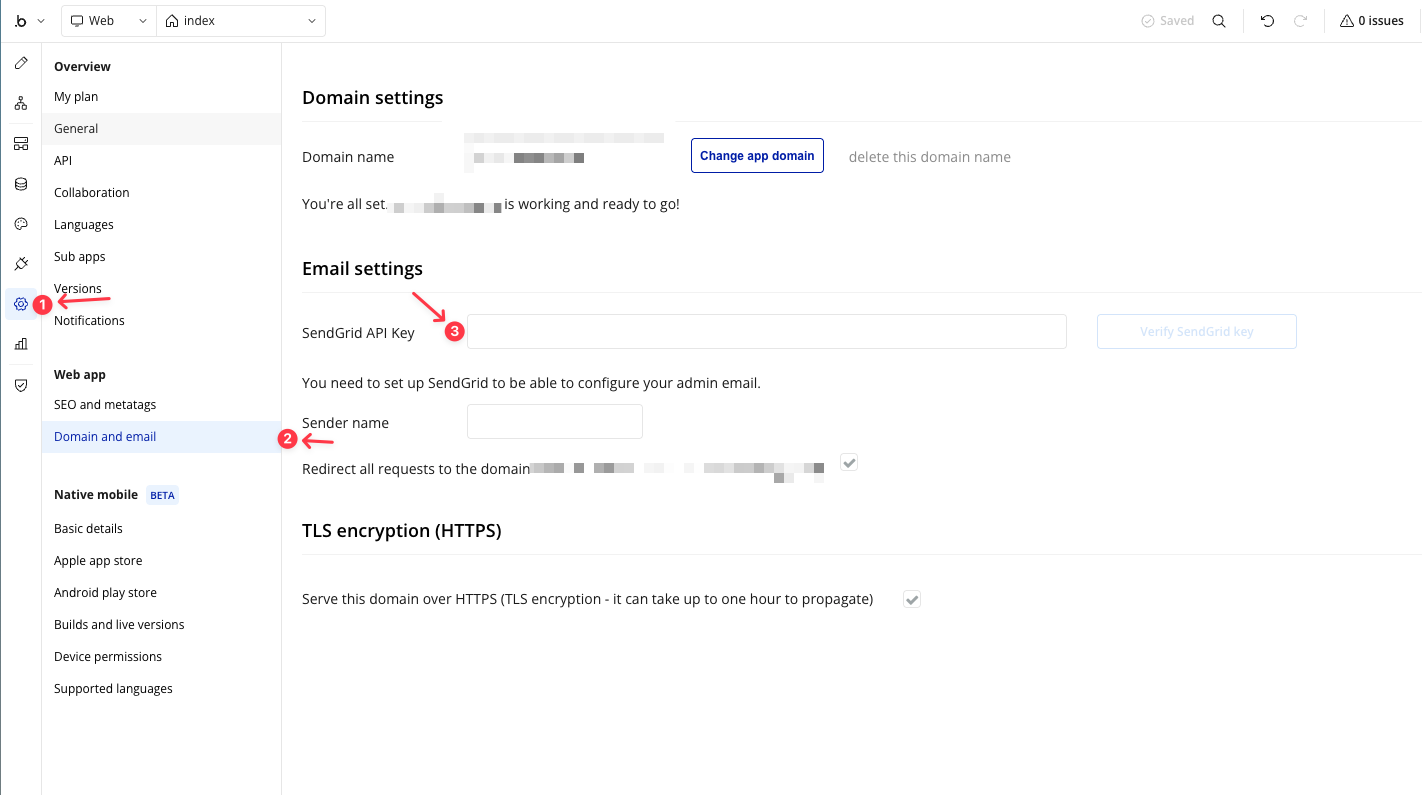
Follow the order shown in my screenshot, and you will find the place to change the SendGrid API key:
Thanks, Carlos. It has really been more than six years since I’ve had a need to send email from my app, so it probably is set up to use an old default SendGrid account. I don’t think I ever set up one of my own.
That makes total sense now! You are likely still trying to send emails through Bubble’s old shared SendGrid account, which is no longer supported for apps without their own credentials.
Nowadays, you must provide your own SendGrid API Key for the email system to work correctly.
Here is the official announcement where Bubble detailed these changes to their SendGrid integration: Important update: Changes to how Bubble integrates with SendGrid
To avoid all that for a one off you can just save the reset token in a field in your DB using a backend WF only and use your editor view to view the token. The forum has a bunch of threads on the details of this…